Demystifying PCI DSS Requirement 11.3.1.2: Why Authenticated Internal Vulnerability Scans Matter
PCI DSS 4.0 introduces several updates aimed at strengthening security practices across organizations. Among these, Requirement 11.3.1.2 mandates authenticated internal vulnerability scans. This change is intended to improve visibility into the cardholder data environment (CDE) and enhance the detection of internal security weaknesses.
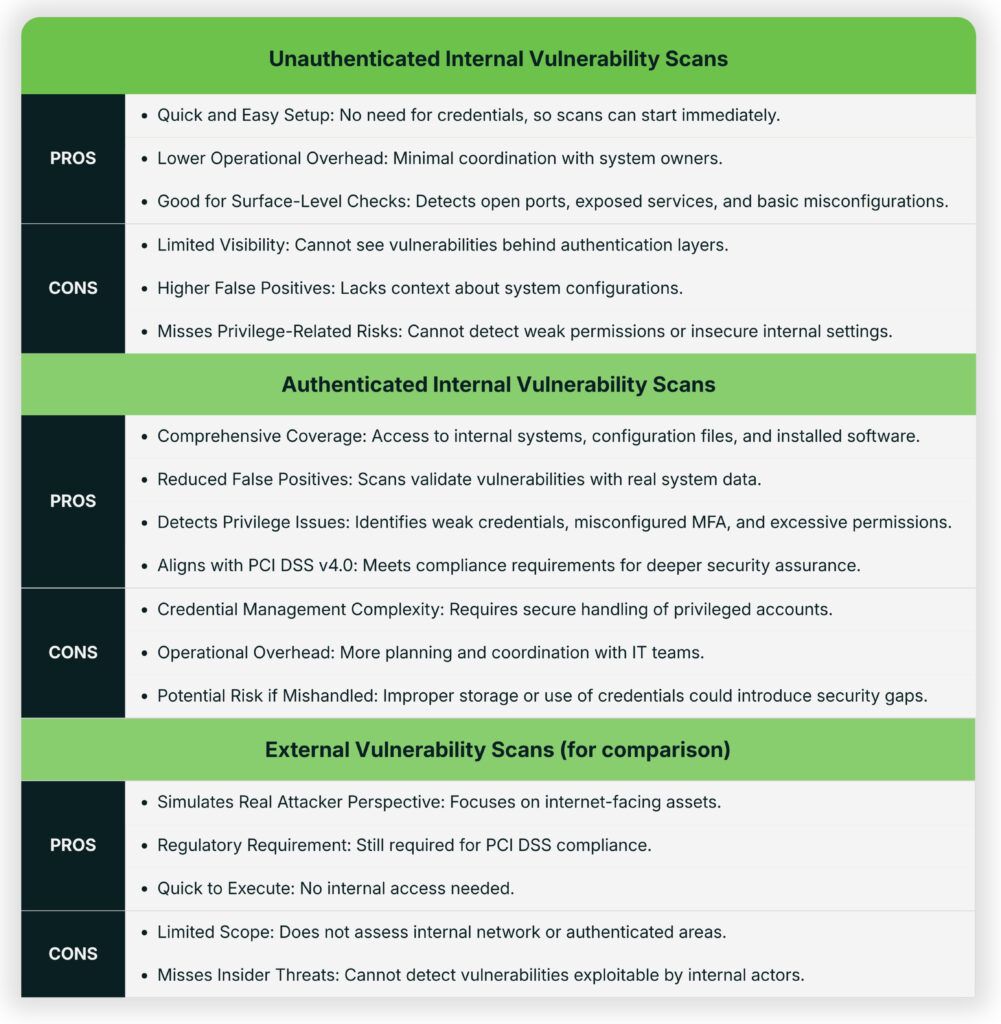
Authenticated internal scans represent a meaningful shift in how organizations assess their security posture. Unlike unauthenticated scans, which offer only a surface-level view, authenticated scans simulate the perspective of a trusted user, revealing vulnerabilities that might otherwise remain hidden.
PCI DSS v4.0: A Transformative Change
PCI DSS v4.0 introduced several enhancements to strengthen payment card security. Among the most impactful is Requirement 11.3.1.2, which mandates authenticated internal vulnerability scans. This requirement represents a significant shift from traditional unauthenticated scans, which often provided only a surface-level view of system security. This evolution provides deeper visibility, reduces false positives, and delivers actionable risk context — ultimately helping organizations prevent breaches before they occur.
Organizations must now:
- Perform credentialed scans at least every three months.
- Continue rescanning until all high-risk vulnerabilities are remediated.
What is Authenticated Scanning?
Authenticated scanning is the process of running a vulnerability scan using valid system credentials. By logging into the system either through an agent or remote access, the scanner can evaluate:
- Installed software and version details
- Missing security patches and hotfixes
- System and service configurations
- User permissions and privilege levels
Unlike unauthenticated scans that reveal only surface-level vulnerabilities, authenticated scans provide an inside view of the operating system and applications, including configuration issues, missing patches, and privilege settings. For PCI DSS 11.3.1.2, this level of inspection is required because they help uncover vulnerabilities that may pose a direct or indirect risk to the CDE, especially when present on systems with access to or potential security impact over the CDE.
Key Benefits of Authenticated Scanning
- Deeper Security Insight: Authenticated scans simulate legitimate user access, revealing vulnerabilities such as weak passwords, insecure APIs, misconfigured authentication flows, and excessive privileges that unauthenticated scans cannot detect.
- Reduced False Positives: By leveraging privileged access, scanners can distinguish between legitimate configurations and exploitable risks. This reduces noise and improves accuracy compared to unauthenticated scans, which often rely on version fingerprints and headers.
- Better Risk Context: Authenticated scans provide contextual insights, enabling organizations to prioritize remediation based on severity and exploitability. They can uncover hidden endpoints, business logic flaws, and sensitive data exposures commonly targeted by attackers.
- Breach Prevention: Credentialed scans mimic the privileged access attackers seek, exposing risks such as inactive accounts, poor privilege management, and unpatched systems. Identifying these weaknesses proactively helps prevent lateral movement during real-world breaches.
- Beyond Compliance: While Requirement 11.3.1.2 ensures compliance, its true value lies in strengthening overall security posture. Authenticated scans deliver comprehensive assessments that go far beyond checkbox compliance.
- Improved MFA and Access Control Validation: Scans can verify whether MFA and access controls are properly enforced, detecting misconfigurations such as missing rate limits, lockout thresholds, or weak push notification handling that could lead to MFA fatigue attacks.
- Operational Efficiency: Authenticated scans confirm whether vulnerabilities are truly exploitable in the current configuration, reducing wasted effort on false positives and accelerating remediation.
Implementing Authenticated Scanning
Successfully adopt Requirement 11.3.1.2 by:
- Review the existing vulnerability management strategy and incorporate authenticated scanning.
- Ensure existing scanning tools support or the procurement of new tools allow credentialed scans and are updated with the latest vulnerability data.
- Assess team capabilities and if necessary; provide training or consider outsourcing if necessary.
- Document exceptions for systems that cannot accept credentials and define compensating controls.
- Configure, execute, and interpret scans with skilled personnel.
- Create dedicated scan accounts with privileged access to avoid reusing existing administrative credentials.
- Perform risk-based remediation and conduct rescans to validate effectiveness.
- Update policies and operational procedures to reflect the new requirements.
- Communicate benefits internally to secure ongoing stakeholder buy-in.
Why Did PCI Add This Requirement?
In earlier versions of PCI DSS, organizations often relied on unauthenticated vulnerability scans, which assess systems from an external or network-facing perspective. While useful for identifying surface-level exposures, these scans miss a broad category of risks, including:
- Missing patches on operating systems and applications
- Misconfigured services not exposed externally
- Outdated or vulnerable software versions
- Weak or excessive user permissions
- Authenticated internal scans provide visibility into the actual state of systems, identifying vulnerabilities that may not be externally visible but could still pose significant risk to the CDE. This reflects an important shift in security strategy, recognizing that many modern breaches stem from exploiting unpatched systems or misconfigurations internally, not just perimeter exposure.
What If Credentials Cannot Be Used?
While PCI DSS 11.3.1.2 mandates organizations perform internal vulnerability scans using authenticated credentials, there are cases where credentialed access may not be feasible such as with legacy systems that lack modern authentication support, specialized OT/ICS devices where scanning could disrupt operations, or vendor-imposed restrictions on credential use.
In these situations, PCI DSS does not permit skipping the scan. Instead, organizations must:
- Document the limitation – Identify the assets and explain why credentials can’t be used.
- Provide a risk-based justification – Describe how compensating controls (e.g., network segmentation, endpoint monitoring, or EDR) reduce exposure.
- Implement alternative methods, such as:
- Host-based agents – Local tools that perform vulnerability checks directly on the machine (PCI DSS recognizes this as an acceptable method if detection capabilities are equivalent).
- Manual configuration reviews – Especially for systems that can’t support agents.
- File integrity monitoring (FIM) – To detect unauthorized changes to system files.
- Conduct a Targeted Risk Analysis (TRA) – Required under PCI DSS 12.3.2 when using a customized approach to meet the intent of 11.3.2.1.
- Engage your QSA – Validate that your alternative approach meets the intent of 11.3.1.2.
These steps help maintain visibility into internal risks and ensure compliance without leaving blind spots in the CDE.
What Privileges Should the Scan Account Have?
To meet the intent of PCI DSS 11.3.1.2, internal vulnerability scans must be performed using authenticated credentials with sufficient privileges to access system-level data. This typically includes:
- Windows: Local Administrator or equivalent rights for registry settings, patch status, and service configurations
- Linux/Unix: Root access or sudo privileges with password-less execution for required scanning commands
Note: It’s important to avoid over-privileging. Accounts such as domain administrators or enterprise-wide credentials should only be used if necessary. Overly powerful accounts increase the risk if compromised and may raise concerns during a PCI assessment. If scanning accounts allow interactive login, they must be managed in accordance with PCI DSS Requirement 8.2.2, including proper access controls, monitoring, and documentation.
How to Comply with 11.3.1.2
Meeting PCI DSS Requirement 11.3.1.2 involves more than enabling a feature in your scanning tool. It requires a deliberate, documented approach to ensure authenticated internal scans are effective and compliant:
1. Use Properly Privileged Accounts
- Windows: Local Administrator or equivalent rights (avoid domain admin unless absolutely necessary).
- Linux/Unix: Root or sudo with passwordless access for required commands.
- Apply the Principle of Least Privilege—grant only the access needed to perform scans.
2. Securely Manage Credentials
Related to 11.3.1.2, under PCI DSS Requirement 8, organizations must properly identify, authenticate, and manage accounts that access system components. For authenticated vulnerability scanning, this means:
- Create dedicated scan accounts with privileged access to avoid reusing existing administrative credentials.
- Follow PCI DSS 8.x controls for password and access management — assign unique IDs (Req. 8.2), enforce strong authentication (Req. 8.3), and change passwords at least annually or whenever compromise is suspected (Req. 8.3.9, 8.3.10).
- Store credentials securely in an encrypted vault or an approved password management solution.
- Monitor and log all use of scanning accounts to detect anomalies and demonstrate proper control of privileged credentials (Req. 8.6.1).
Implementing these measures ensures that scanning accounts meet PCI’s intent for secure access control while minimizing the risk of credential misuse or exposure.
3. Address Systems That Don’t Support Credentials
Some systems (e.g., legacy systems, OT/ICS devices, vendor-restricted appliances) may not support credentialed scanning. In these cases:
- Document the limitation and explain the technical or operational constraint.
- Implement compensating controls like segmentation, endpoint monitoring, host-based agents, or manual configuration reviews.
- If using a customized approach, conduct a Targeted Risk Analysis (TRA) under PCI DSS 12.3.2 to justify the deviation.
- Engage your QSA to validate that your compensating control or customized approach meets the intent of 11.3.1.2.
Why This Requirement Matters for Your PCI Program
- Demonstrates Security Maturity – Implementing authenticated scans shows that your organization is committed to proactive risk management, not just meeting baseline compliance. It reflects alignment with PCI DSS’s emphasis on continuous security improvement.
- Identifies Hidden Vulnerabilities – Credentialed scans provide access to internal system data, revealing issues like missing patches, misconfigured services, and excessive privileges–vulnerabilities that unauthenticated scans often miss.
- Enables Continuous Monitoring – Performing scans at least quarterly and after significant changes ensures that systems are regularly assessed, reducing the risk of undetected vulnerabilities between audits.
- Reduces Breach Risk – By identifying and addressing internal weaknesses early, such as outdated software or insecure configurations, organizations can prevent attackers from exploiting gaps that could lead to compromise of the CDE.
Key Takeaway
PCI DSS v4.0 Requirement 11.3.1.2 is more than a compliance mandate — it is a strategic opportunity to strengthen organizational resilience. Authenticated scanning can uncover hidden risks, reduce false positives, and provide actionable insights that help organizations stay ahead of evolving threats. Passing an annual PCI assessment is important, but building a robust security posture is essential to preventing the next data breach.
We Can Help
Tevora’s experienced experts can answer any questions about PCI and would welcome the opportunity to help you meet compliance standards. Just give us a call at (833) 292-1609 or email us at [email protected].