Taken down ≠ Gone. How the Wayback Machine is Keeping Security Risks Alive

“The internet is forever” is something we have always heard, but sometimes it’s easy to forget. Even if an organization removes sensitive files, outdated configurations, or internal documents from its servers, copies often remain on the internet. These artifacts may persist indefinitely through a source called the Wayback Machine. While designed to preserve the web for historical research, it often acts as a gold mine for penetration testers, bug bounty hunters, and unfortunately, malicious actors.
Some files should never have been public facing in the first place, and this post explores how the Wayback Machine and its CDX Server API can be used to uncover sensitive information, with an emphasis on fetching sensitive files. We will also walk through a proof-of-concept (POC) to show you how automation can streamline this process so organizations can take an additional to defend against exposure.
Wayback Machine? API? CDX Server API?
The Internet Archive’s Wayback Machine is a massive historical archive of the web. Since 1996, it has been crawling and storing snapshots of websites, preserving old versions of pages that may no longer exist online. While most people know it as a tool to visually browse older versions of websites through their web interface, for security researchers it is far more valuable: it’s a historical record of what organizations have accidentally exposed to the internet .
Automating discovery against the Wayback Machine is about interacting with its APIs instead of manually browsing the site. An API (Application Programming Interface) allows us to query structured data directly, rather than relying on screenshots or UI navigation. This is critical in offensive security and bug bounty work because it means we can systematically enumerate every URL ever captured for a given domain without having to click through all the archive pages manually.
One of the most useful tools for this is the Wayback CDX Server API. A CDX file is essentially an index that the Wayback Machine generates to catalog archived pages. The CDX Server API exposes the index through an endpoint that supports queries, giving us the ability to retrieve entire URL lists in either text or JSON format. Instead of asking “show me what this page looked like in 2015,” one can ask “give me every URL ever recorded under example.com.” From there, the results can be filtered, collapsed, or restricted by file type.
Here’s a simple example query:

Breaking this down:
- url=*.example.com/* tells the API to search across all subdomains of example.com.
- fl=original returns the originally captured URLs.
- collapse=urlkey removes duplicate entries.
- output=text formats the response for easier parsing.
This command alone can return a multitude of URLs across years of history. Many of these represent files and endpoints that may no longer exist in production but still hold value to an attacker. We will dig deeper into how we can sift through this information to create a shorter list of URLs that attackers may try to target.
Enumerating Specific File Extensions
To narrow the results to potentially sensitive files, filters can be applied. For example, the following query captures a wide range of extensions often associated with secrets, backups, or configuration leaks:
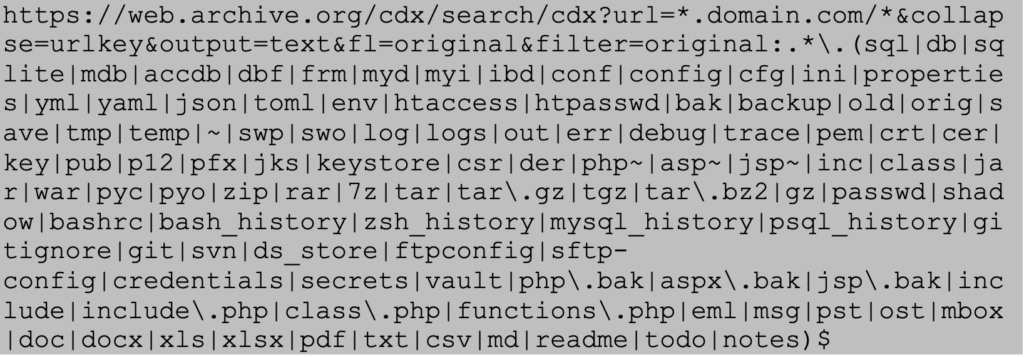
Attackers Often Try to Find the Following Files
- Database files (.sql, .db, .sqlite, .mdb, .accdb, .dbf, .frm, .myd, .myi, .ibd)
- Configuration files (.conf, .config, .cfg, .ini, .properties, .yml, .yaml, .json, .toml, .env, .htaccess, .htpasswd)
- Backup files (.bak, .backup, .old, .orig, .save, .tmp, .temp, .~, .swp, .swo, .php~, .asp~, .jsp~, .php.bak, .aspx.bak, .jsp.bak)
- Log files (.log, .logs, .out, .err, .debug, .trace)
- Key/Certificate files (.pem, .crt, .cer, .key, .pub, .p12, .pfx, .jks, .keystore, .csr, .der)
- Archive files (.zip, .rar, .7z, .tar, .tar.gz, .tgz, .tar.bz2, .gz)
- Source code files (.inc, .class, .jar, .war, .pyc, .pyo, .include, .include.php, .class.php, .functions.php)
- System files (.passwd, .shadow, .bashrc, .bash_history, .zsh_history, .mysql_history, .psql_history)
- Development files (.gitignore, .git, .svn, .ds_store, .ftpconfig, .sftp-config, .credentials, .secrets, .vault)
- Email files (.eml, .msg, .pst, .ost, .mbox)
- Document files (.doc, .docx, .xls, .xlsx, .pdf, .txt, .csv, .md, .readme, .todo, .notes)
Attackers know these files frequently contain credentials, API keys, or architecture details that can be weaponized in the later stages of an attack.
Accessing Deleted Files via 404 Errors
A common misconception is that once a file is deleted from the internet, it is removed permanently from externally facing hosts. However, if the Wayback Machine captured it, that snapshot often remains accessible.
Suppose you query for sensitive files and many of the resulting links now return “404 Not Found” on the live domain. By pasting those same URLs into the Wayback Machine directly, you can often retrieve older versions of the deleted file. This technique enables attackers to resurrect files long after they are removed from the original server, effectively bypassing the organization’s cleanup efforts.
Disclaimer
The following proof-of-concept is provided for educational and defensive security purposes only. It is intended to help organizations understand potential risks and improve their security posture. Do not attempt these techniques against systems you do not own or have explicit authorization to test.
Proof-of-Concept
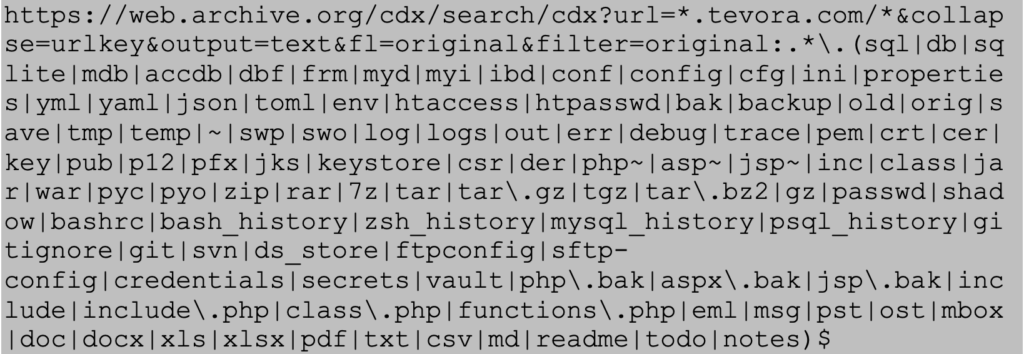
For this demonstration, Tevora’s website will be used as an example since authorization was given by the company. Wayback’s CDX Server API was used to search for all sensitive file extensions related to Tevora.com using the following query.
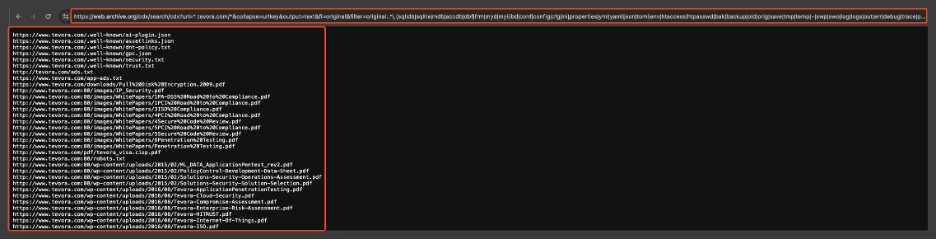
Snippet of URLs that are outputted using the specific query above:
Since Tevora has gone through extensive testing to remain secure, for this POC we can assume that an attacker wanted to access the following PDF file because it may have sensitive information.
The PDF that we will try to access:
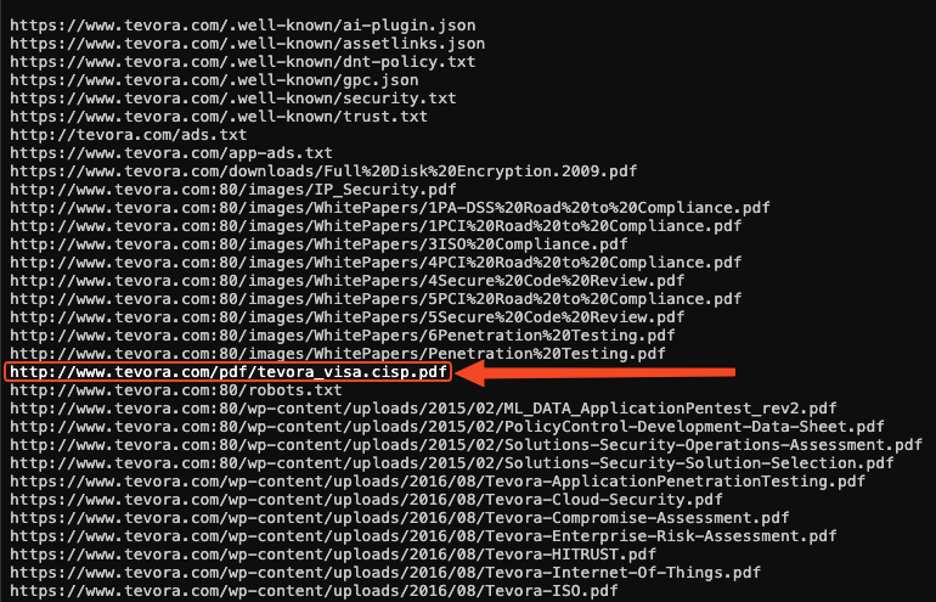
When trying to curl that URL, a 404-error is given stating that the server could not find the webpage or resource that was requested:
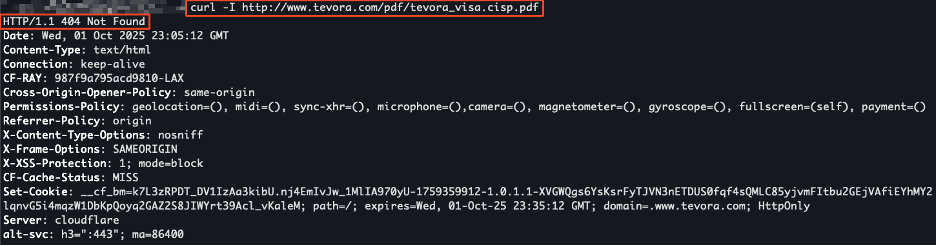
Instead, we take this URL and try to view the PDF file using the Wayback Machine:
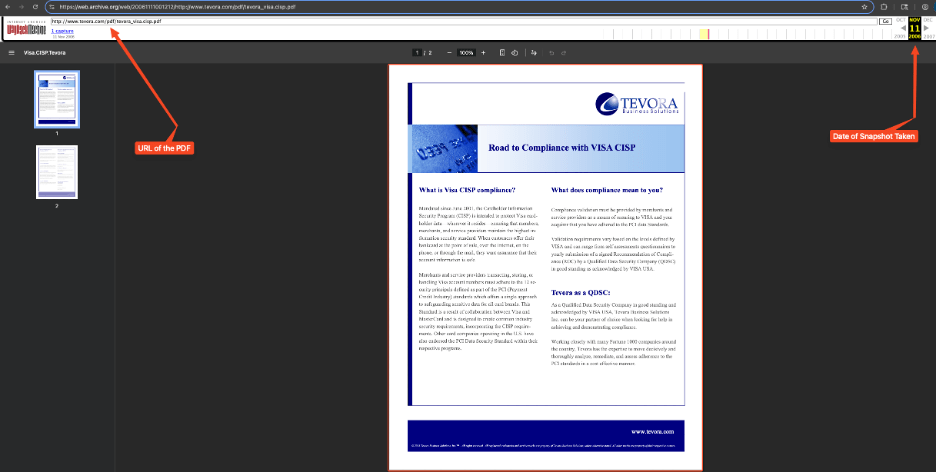
This proof-of-concept shows that even though the PDF was not accessible anymore, attackers could still view historical data and, depending on the sensitivity of the data that is accessible, they can formulate an attack against an organization.
Automation Script
To streamline this process, here’s a sample Python script that automates the workflow:
- Query the CDX API for all URLs.
- Filter for sensitive file extensions.
- Check which filtered URLs return a 400-series error.
- Save results into separate files for review.
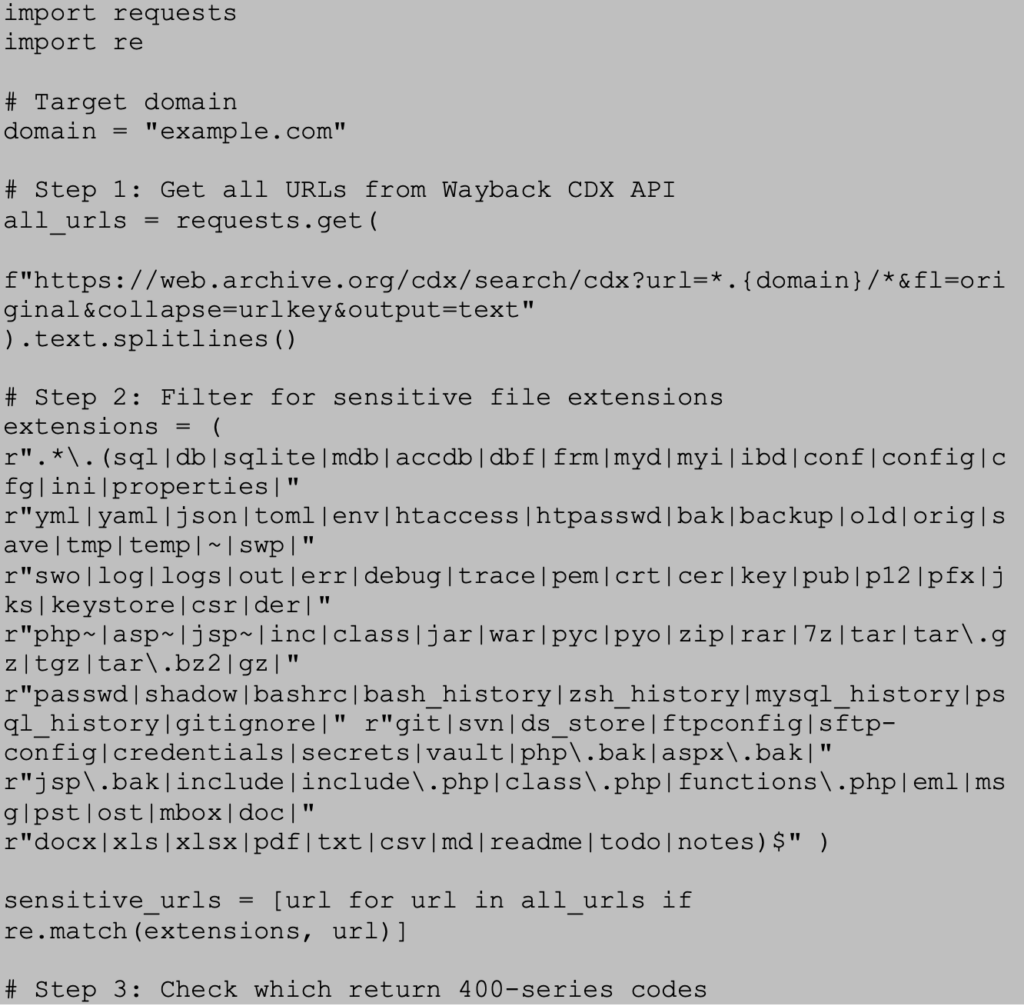
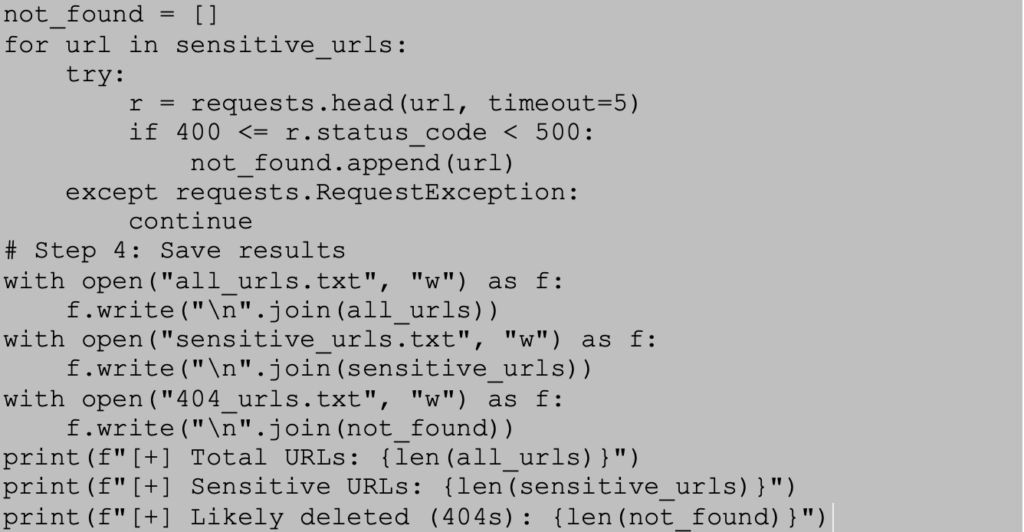
This script provides a scalable way to enumerate and filter through historical files from a domain without needing to manually review each available archive.
Remediation
Organizations cannot erase the internet’s memory, but they can reduce risk. Tevora recommends the following measures:
- Ensure that sensitive files, such as configuration files, database backups, and keys are never hosted on public-facing systems.
- Rotate any credentials, keys, or secrets that have been exposed, even historically.
- If you want to have archived versions of your website removed from web.archive.org, please submit a request to [email protected] by following the instructions provided in the linked resource.
- Perform periodic external penetration tests as part of a holistic security program to ensure ongoing compliance and to adapt to evolving threat landscapes.
Tevora’s Threat Team can help reduce these and many more external exposures through advanced penetration testing, red teaming, and continuous assessment services.
Do not wait for attackers to find your exposures—let Tevora’s penetration testing team uncover them first. Learn more here or reach out to us directly at [email protected]
References:
- https://www.tevora.com/what-we-do/threat-management-response/penetration-testing/
- https://help.archive.org/help/how-do-i-request-to-remove-something-from-archive-org/
- https://archive.org/developers/wayback-cdx-server.html
- https://web.archive.org/